
How To Reset A Husqvarna Automower: Easy Guide
If your Husqvarna Automower is frozen, offline, stuck in a loop, or showing an error, start with a simple restart. A restart does not erase your settings. If you need to remove schedules, boundary settings, paired phones, or user data, use the mower’s reset menu or the Automower Connect app. The exact menu names vary by model and software version.
This guide applies to Husqvarna Automower robotic lawn mowers sold in the United States. Before using a full factory reset, find your mower’s exact model and read its current owner’s manual. A reset can remove settings that may take time to enter again.
Choose the Right Type of Reset
Husqvarna Automower has more than one kind of reset. Choose the least disruptive option that matches the problem.
| Reset type | What it does | When to use it |
|---|---|---|
| Restart or power cycle | Turns the mower off and on | The mower is frozen or does not respond |
| Reset user settings | Removes selected settings | Schedules or mower behavior seem wrong |
| Factory reset | Returns many settings to their original state | You are selling the mower or starting setup again |
| App or connection reset | Repairs phone, Bluetooth, or cellular pairing | The mower works but the app cannot connect |
| PIN recovery | Restores access when the PIN is unknown | You cannot unlock the mower |
A restart is usually the best first step. It is quick and normally keeps the mowing schedule, installation data, and security settings.
A factory reset is more serious. It may remove schedules, timers, installation settings, Wi-Fi or cellular details, user preferences, and paired devices. The exact result depends on the Automower model.
How to Restart a Husqvarna Automower
Use a restart when the mower is slow, frozen, unresponsive, or showing a temporary error.
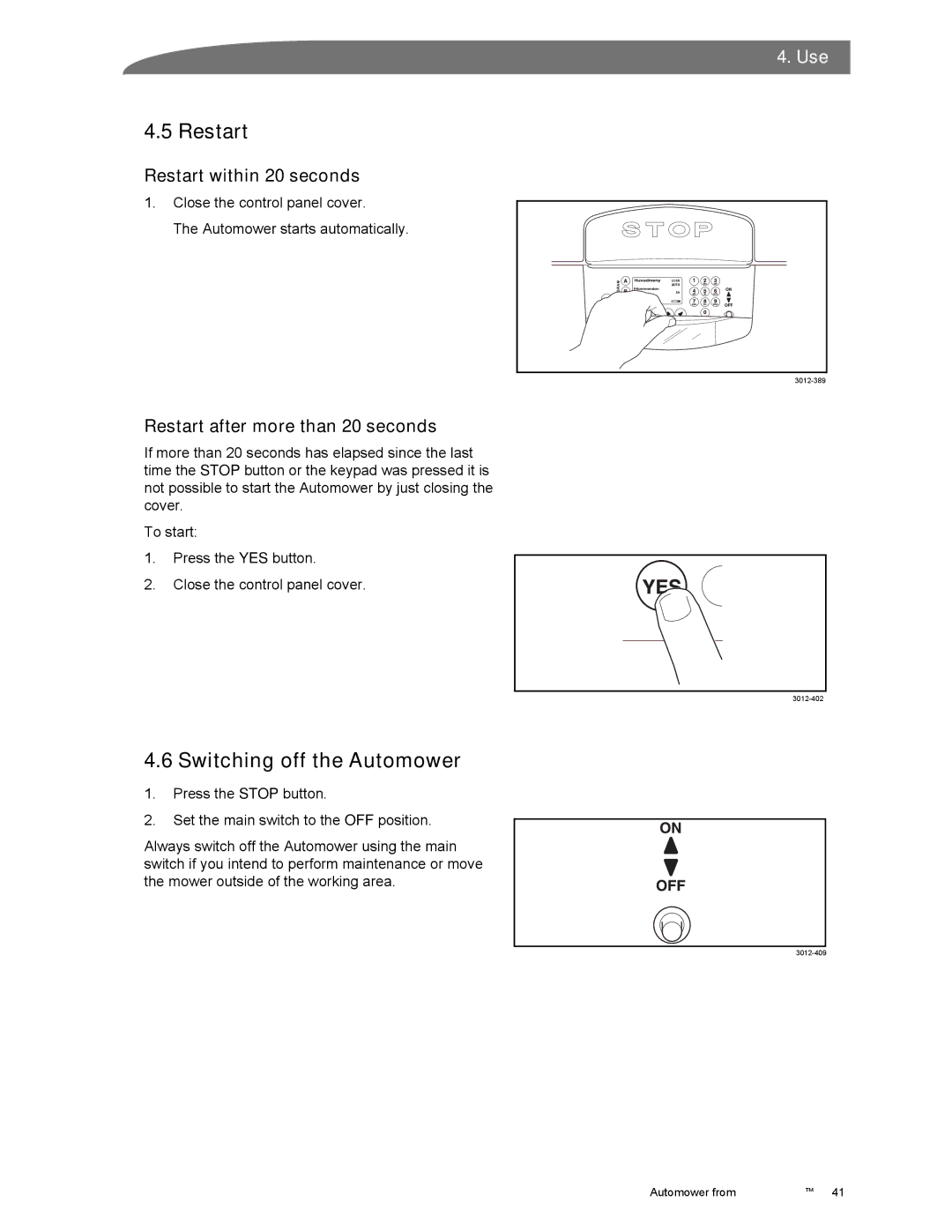
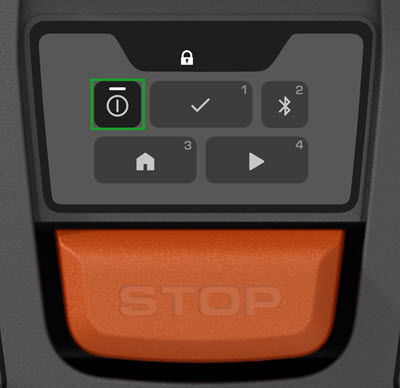
- Press the STOP button.
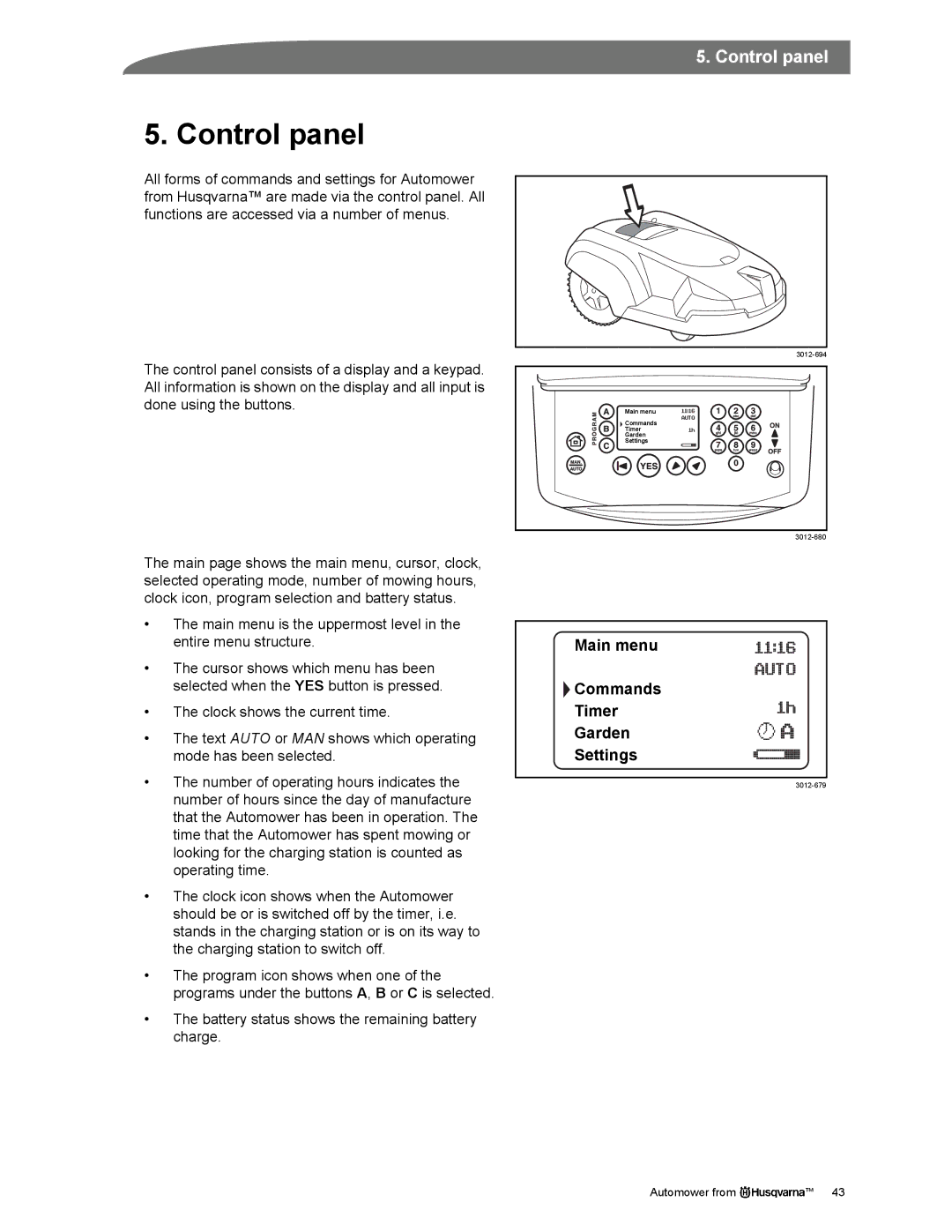
- Open the keypad or display cover if your model has one.
- Enter the PIN if the mower asks for it.
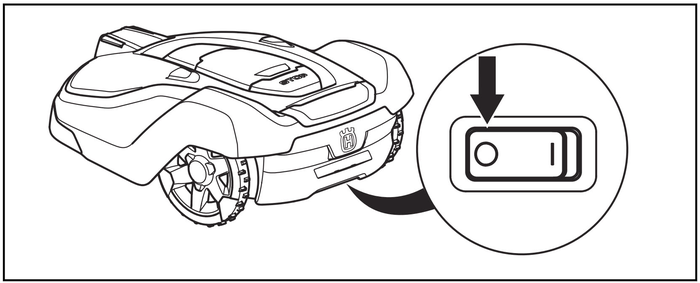
- Set the main switch to OFF. The switch is often under the top cover.
- Wait at least 30 seconds.
- Set the main switch to ON.
- Close the display cover.
- Enter the PIN if required.
- Place the mower in the charging station and allow it to charge.
- Test a manual start only after the mower shows a normal charging or ready status.
Do not pull the mower from the charging station while it is moving into place. Press STOP first, then turn the main switch off.
If the mower will not turn off
If the display is frozen, hold the STOP button and then use the main switch. If the mower still does not respond, remove it from the charging station only after it has stopped. Do not open the cutting system or touch the blades while the main switch is on.
A restart is successful when the display responds, the mower accepts the PIN, and it can return to or leave the charging station normally.
How to Reset Automower Settings From the Mower
Many Husqvarna Automower models include a reset option in the mower’s menu. The wording can differ between models, so use the closest matching menu shown on your display.
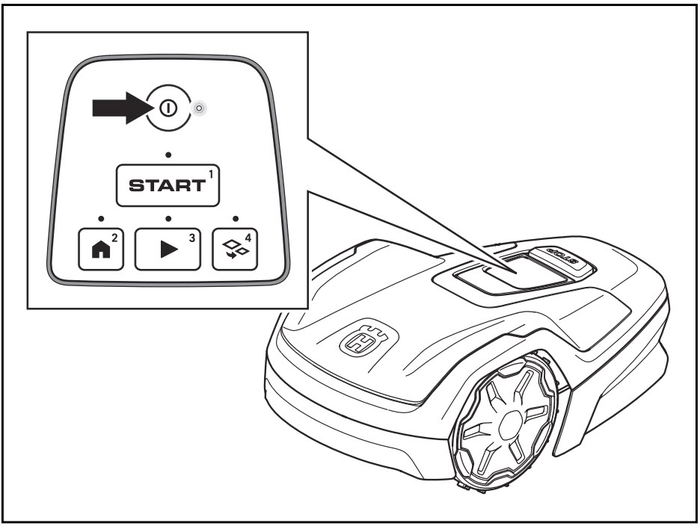
- Press STOP.
- Open the keypad or display cover.
- Enter the mower’s PIN.
- Open Menu or Settings.
- Select General.
- Look for Reset, Reset settings, or a similar option.
- Choose the reset level offered by your model.
- Confirm the reset when prompted.
- Keep the mower powered on until the process finishes.
- Enter the settings again if the mower requests them.
Some models let you reset user settings without clearing all installation data. Other models provide only a broader factory reset. Do not select a full reset unless you are ready to set up the mower again.
What you may need to enter again
After a reset, the mower may ask for some or all of the following:
- Language
- Date and time
- PIN
- Mowing schedule
- Cutting height
- Frost protection settings
- ECO mode
- Weather timer settings
- Corridor width
- Starting points
- GPS-assisted navigation settings
- Boundary wire or guide wire installation data
- Automower Connect pairing
The mower may not erase every item on every model. Check the owner’s manual for the exact reset behavior.
Record your settings before a factory reset
Take photos of the settings screens before you reset the mower. Also write down:
- Your mowing schedule
- Cutting height
- PIN-related settings
- Guide wire settings
- Starting points
- Corridor settings
- Automower Connect account details
- Any error codes
This simple step can save setup time.
How to Factory Reset Automower Connect
If the mower operates normally but the phone app cannot connect, reset the connection before resetting the entire mower.
First, check the simple causes:
- Turn on Bluetooth if you use a Bluetooth-only connection.
- Stand close to the mower during Bluetooth pairing.
- Confirm that the mower has power.
- Check that the mower is not in an active alarm state.
- Update the Automower Connect app through the Apple App Store or Google Play.
- Restart your phone.
- Restart the mower.
The app menu can vary by model and app version. In general, open Automower Connect, select your mower, and look under mower details, settings, or connection options. Remove or reset the connection only when the app offers that function.
You may need to pair the mower again after the reset. Keep the mower’s PIN available. If the mower uses cellular communication, a reset may also require the mower to reconnect to the cellular service.
Bluetooth and cellular models are different
A Bluetooth model usually needs your phone nearby. A cellular-equipped model may communicate over a mobile network, but it still needs a supported service plan, network coverage, and a compatible Automower Connect setup.
A phone-app reset will not repair a damaged boundary wire, a blocked charging station, a worn blade motor, or a failed mower battery. Reset the app only when the problem is clearly related to communication.
How to Reset a Forgotten Automower PIN
A factory reset is not a safe way to bypass a forgotten PIN. Husqvarna Automower uses the PIN as part of its theft protection. The correct recovery method depends on the model and proof of ownership.
Try these steps:
- Check the mower’s original paperwork.
- Look for the PIN in your setup records.
- Check the Automower Connect account if the PIN is stored or referenced there.
- Find the mower’s product number and serial number.
- Contact an authorized Husqvarna dealer or Husqvarna customer support.
- Be ready to provide proof of ownership.
Do not guess the PIN repeatedly. A security lockout or alarm may become more difficult to resolve.
The serial number and product number are useful because Husqvarna has many Automower generations. Instructions for an older model may not match a newer model, even when the mower looks similar.

What to Do When the Reset Does Not Work
A failed reset often means the original problem is not software-related. Work through these checks in order.
The mower still freezes
Check the following:
- Charge the mower fully.
- Clean grass from the wheels and cutting deck.
- Confirm that the main switch is firmly in the ON position.
- Inspect the charging station for damage.
- Make sure the mower is not trapped against an edge, fence, or object.
- Look for a new error message after the restart.
If the mower freezes again soon after a reset, note what it was doing when the fault occurred. Repeated freezing can point to a battery, charging, motor, sensor, or control-board problem.
The mower says it has no loop signal
A reset will not repair a boundary-loop fault. Check that:
- The charging station has power.
- The station indicator light shows a normal status.
- The boundary wire is not cut.
- The guide wire is connected.
- Wire connectors are dry and secure.
- Recent digging, edging, or landscaping has not damaged the wire.
Follow the model’s manual for interpreting the charging-station light. The light pattern is not identical across every Automower model.
The mower leaves the station but will not mow
Check the schedule, date, time, rain or frost settings, and battery level. Also check whether the mower has an active alarm or a message that the cutting system is blocked.
If the cutting motor stops, turn off the main switch before inspecting the blades. Wear gloves and keep your hands away from the blades. Never test the cutting system while a person or pet is near the mower.
The app still will not connect
Try this order:
- Restart the mower.
- Restart the phone.
- Update the Automower Connect app.
- Check Bluetooth permissions or cellular coverage.
- Confirm that the correct mower is selected in the app.
- Remove and pair the mower again if the app provides that option.
- Contact Husqvarna support if the mower remains unavailable.
Do not repeatedly delete and recreate the mower in the app without recording the mower’s account and pairing details.
When You Should Contact Husqvarna or a Dealer
Contact Husqvarna support or an authorized dealer when:
- The mower will not power on after charging.
- The battery becomes unusually hot or swells.
- The charging station has damaged wiring.
- The mower repeatedly reports a motor or sensor fault.
- You cannot recover the PIN.
- A factory reset does not complete.
- The mower has physical damage.
- The mower was exposed to water beyond its normal operating conditions.
- The mower repeatedly stops after a short run.
Stop using the mower if you see smoke, smell burned plastic, hear severe grinding, or find damaged electrical parts. Turn the main switch off and move the mower away from combustible materials if it is safe to do so.
Do not open the battery compartment or electronic control system unless the service instructions for your exact model allow it. Unauthorized repairs can create safety risks and may affect warranty coverage.
Reset Options by Problem
Use this table as a quick decision guide.
| Problem | First action | If that fails |
|---|---|---|
| Frozen screen | Restart the mower | Check for battery or control faults |
| Wrong mowing times | Check schedule and clock | Reset user settings |
| App cannot connect | Restart phone, app, and mower | Re-pair the app |
| Forgotten PIN | Check records and contact support | Provide proof of ownership |
| No loop signal | Check station and wire | Repair the loop or call a dealer |
| Mower will not charge | Check station power and contacts | Inspect battery and charger |
| Selling the mower | Record needed information | Perform the model-specific factory reset |
| New owner setup | Remove old app pairing | Follow the new owner’s installation steps |
The main trade-off is simple: a restart preserves settings, while a factory reset may remove them. Always begin with the least disruptive option.
Frequently Asked Questions
Does resetting a Husqvarna Automower erase the PIN?
Not always. The result depends on the model and the type of reset. Some resets remove user settings but preserve security data. Others may require you to create or enter security settings again. Check the exact owner’s manual before confirming a factory reset.
Will a reset fix a broken boundary wire?
No. A reset changes software or stored settings. It cannot repair a cut boundary wire, loose connector, damaged guide wire, or failed charging station.
How long should I leave the Automower turned off?
For a normal restart, 30 seconds is usually enough. If the mower has been unresponsive, leave it off for several minutes before turning it on again. A longer wait does not repair physical damage or a failed battery.
Do I need to reset Automower before selling it?
Yes, remove your personal connection and return the mower to a clean setup state. The exact steps depend on the model. Record the serial number, remove the mower from your Automower Connect account when applicable, and complete the model-specific factory reset.
Can I reset Automower without the PIN?
Usually, no. The PIN protects the mower from unauthorized use. If you are the owner and cannot remember it, contact Husqvarna or an authorized dealer with proof of ownership.
Why does the mower still show an error after a factory reset?
A factory reset cannot repair hardware, wiring, battery, charging, motor, or sensor problems. If the same error returns, record its exact wording and contact Husqvarna support or a dealer.
Final Steps
For most problems, restart the mower first. If the fault concerns schedules or stored preferences, use the reset option in the mower menu. Use a factory reset only after recording your settings and confirming the instructions for your exact US model.
Your next step is to locate the mower’s model name, product number, and serial number. Then use Husqvarna’s official owner’s manual and support pages for the exact reset path. This avoids applying instructions from a different Automower generation.
Official reference points
- Husqvarna US Automower support
- Husqvarna US manuals and downloads
- Automower Connect support within the Husqvarna US support section
- An authorized Husqvarna dealer for PIN recovery, electrical faults, and repairs


