
How To Install A Robot Lawn Mower: Easy Setup Guide
A robot lawn mower can cut a U.S. lawn with little daily work, but it must first learn the yard’s limits. Most models use a charging station, boundary wire, guide wire, or GPS-based map. The basic process is to plan the mowing area, place the station, install the boundary system, test the mower, and adjust the settings.
Always follow the manual for your exact model. Wire depth, maximum slope, required clearance, app setup, and charging-station placement vary by brand.

What You Need Before Installing a Robot Lawn Mower
Before you begin, confirm that the mower fits your lawn and that you have a safe place for the charging station. A robot mower is not a good fit for every yard.
Check these points first:
- Lawn size: The mower’s rated area should exceed your actual mowable area. Do not count patios, beds, ponds, steep banks, or fenced areas that the mower cannot reach.
- Lawn shape: Narrow passages, divided lawns, and many small islands may require guide wires, extra zones, or manual moving.
- Slope: Use the maximum slope listed in the owner’s manual. A slope that looks mild can become slippery when wet.
- Ground condition: Fill holes, remove loose stones, and repair exposed roots before installation.
- Power access: The charging station needs a suitable outdoor power source. In the United States, outdoor outlets should have ground-fault circuit-interrupter protection where required by local electrical code.
- Pets and children: The mower needs a controlled operating area. It should not run where children, pets, or wildlife may be present without supervision.
- Weather exposure: The station needs stable ground and protection from standing water. Follow the manual for rain and storm use.
- Wireless coverage: GPS, Wi-Fi, cellular, or Bluetooth features may need a clear view of the sky or a strong signal.
Basic installation tools
Most boundary-wire systems need:
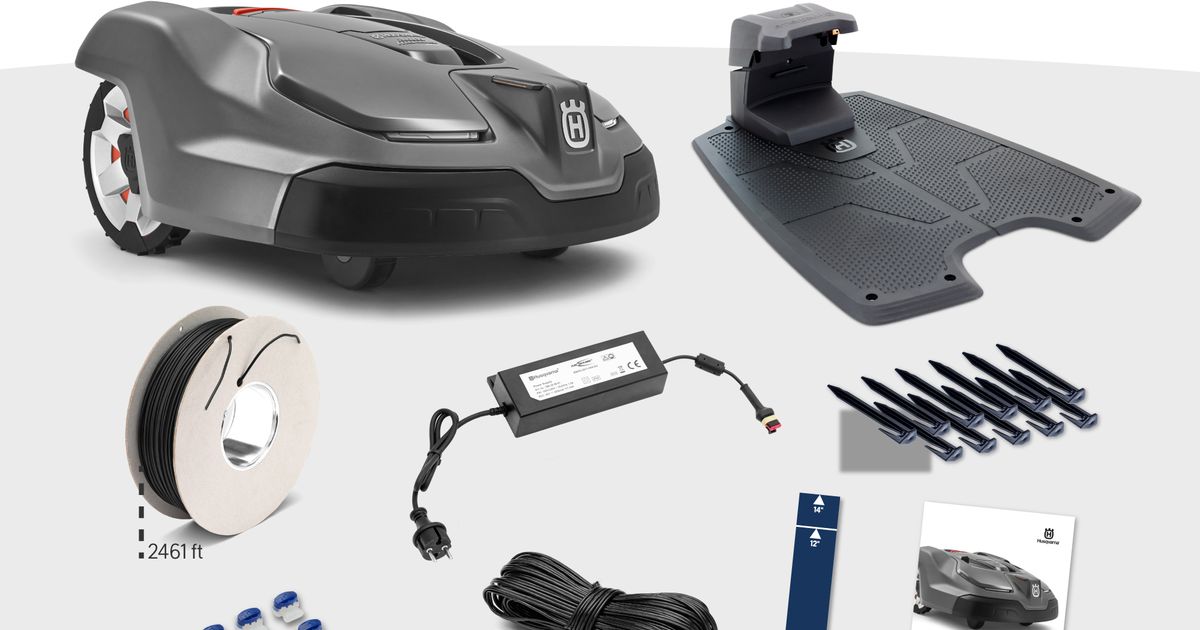
- Boundary wire supplied by the manufacturer
- Wire stakes or pegs
- Wire connectors approved for the mower system
- Charging-station screws or anchors
- A tape measure
- A mallet or hammer
- A shovel or edging tool
- A level
- Outdoor-rated extension equipment only if the manufacturer permits it
- A smartphone with the mower app, if required
Do not substitute random wire connectors or power supplies. A connector can look secure while allowing moisture into the electrical joint.
How Robot Lawn Mower Navigation Works
A robot mower stays inside its mowing area by using one or more guidance systems.
Boundary wire systems
A boundary-wire mower sends a low-voltage signal through a wire around the cutting area. The mower detects that signal and turns away before crossing the boundary.
The wire usually surrounds:
- The outside edge of the lawn
- Trees or planting beds
- Ponds and pools
- Drop-offs
- Play areas
- Garden ornaments
- Areas where the mower must not travel
Some models also use a guide wire or search wire. This wire helps the mower find the charging station or travel through a narrow passage.
GPS and wireless mapping systems
Some newer robot mowers map the yard with GPS, cameras, radar, Bluetooth, or other sensors. These systems may not need a physical boundary wire, but they still need careful mapping.
Wireless systems can be affected by:
- Tall buildings
- Dense tree cover
- Narrow side yards
- Fences and metal structures
- Poor cellular or Wi-Fi coverage
- Signal loss near the edge of the property
A wireless mower still needs physical safety boundaries. Mapping a zone does not remove the need to inspect the yard for hazards.
How to Plan the Mowing Area
Planning the route before laying wire prevents most installation problems. Walk the entire property and mark every area the mower should avoid.
Mark permanent obstacles
Identify objects that could damage the mower or block its path:
- Swimming pools and ponds
- Retaining-wall edges
- Steps
- Drainage ditches
- Vegetable gardens
- Dog runs
- Sandboxes
- Gravel paths
- Mulch beds
- Low tree branches
- Large exposed roots
- Decorative rocks
Use a physical barrier when a boundary wire alone cannot prevent a dangerous fall. A robot mower may detect a wire, but it may not detect a sharp drop beyond the wire.
Measure narrow passages
Measure the tightest path between buildings, fences, beds, and other obstacles. Compare that measurement with the minimum passage width in the mower manual.
A mower may fit through a passage but still fail to navigate it. Turning space, wheel grip, guide-wire placement, and uneven ground all affect performance.
Plan separate lawn zones
A robot mower may not reach every lawn area from one charging station. You may need separate zones if the property has:
- A front and back lawn with no connecting route
- A gate that stays closed
- A narrow walkway
- Different lawn levels
- A steep or unsafe transition
Some models support multiple zones in the app. Others require the owner to carry the mower to a second area. Confirm this before installation.
Where to Place the Charging Station
Place the charging station on a flat, firm section of lawn with a clear approach. The mower must be able to leave and return without hitting a curb, fence, wall, or sharp turn.
A good location usually has:
- Firm, level ground
- Good drainage
- A clear path in front of the station
- Enough side and rear clearance for the specific model
- Access to the approved power supply
- Protection from frequent flooding
- Adequate satellite, Wi-Fi, or cellular signal when required
Do not place the station at the bottom of a slope, beside a drain outlet, or where sprinklers soak the electrical equipment.
Align the station correctly
Many stations must face a certain direction or align with the boundary wire. Follow the diagram in the manual. Small alignment errors can cause the mower to miss the station or approach it at the wrong angle.
Keep the station straight while securing it. Use a level if the ground is uneven.
Secure the station
Attach the station with the supplied screws or anchors. A loose station can move when the mower docks. Even a small shift can interrupt charging or break the wire connection.
Do not bury or hide the power adapter unless the instructions allow it. Keep electrical parts protected from water and physical damage.
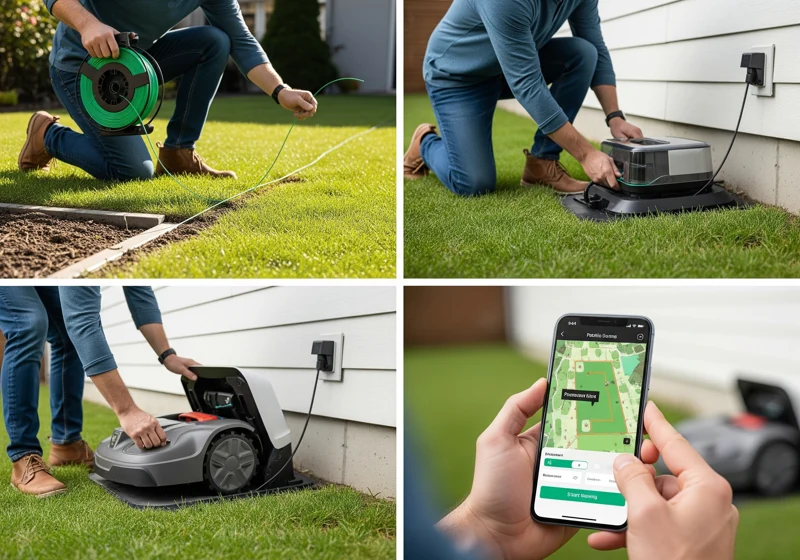
How to Install a Boundary Wire Robot Lawn Mower
The most reliable method is to install the wire above ground first. Test the mower. Then bury the wire if you want a cleaner finish.
1. Charge the mower
Fully charge the mower before the first test. Install the battery according to the manual and turn the mower off while making wire or station connections.
2. Connect the boundary wire to the station
Most systems have two boundary-wire terminals. The wire leaves one terminal, travels around the mowing area, and returns to the other terminal.
Keep the wire path continuous unless the manual shows another layout. A break, loose terminal, or incorrect connection can make the mower report a boundary fault.
3. Lay the wire around the lawn
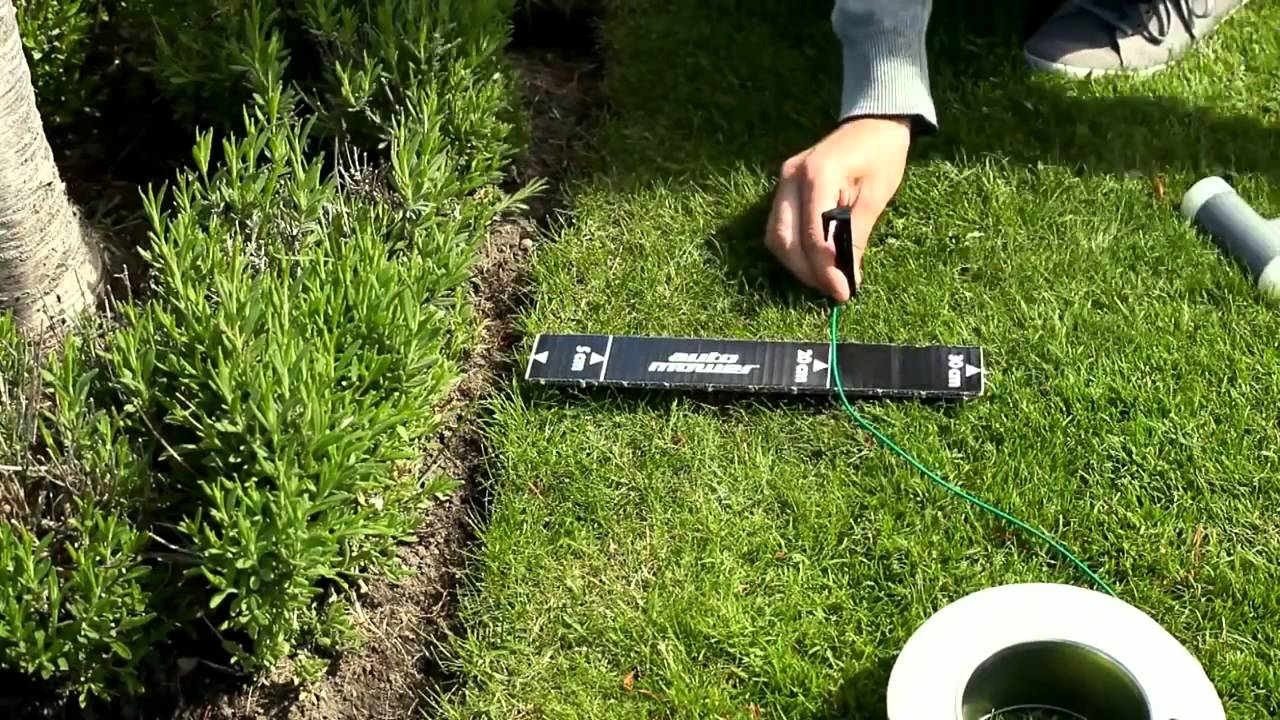
Walk the wire around the planned mowing zone. Keep it smooth and close to the ground. Do not leave loops, knots, or loose sections where the mower could catch a wheel.
Use the distances in the manual for:
- Edges beside walls and fences
- Paved surfaces
- Flower beds
- Drop-offs
- Water
- Gravel
- Tree trunks
- Corners
Do not copy a distance from another brand. Detection technology differs between models.
4. Secure the wire with stakes
Place stakes often enough to hold the wire flat, especially around turns and uneven ground. Push each stake fully into the soil.
The wire should not rise above the grass where a mower blade, foot, pet, or trimmer can catch it.
5. Install exclusion loops
Create a loop around an obstacle when the manual requires one. The outgoing and returning sections often need to run close together so the mower does not treat the narrow gap as lawn.
Use exclusion loops for objects such as:
- Trees
- Isolated beds
- Small ponds
- Boulders
- Birdbaths
- Play structures
Avoid making tiny islands. A mower may not have enough room to turn inside them, and a small mistake can create a dead zone.
6. Create guide-wire paths
If the model uses a guide wire, connect and route it exactly as shown by the manufacturer. Guide wires often need to cross the lawn from the station into a remote section.
A guide wire can help the mower:
- Find a distant part of the lawn
- Return to the station
- Pass through a narrow corridor
- Reach more than one mowing zone
Do not assume that a boundary wire can replace a guide wire. They serve different purposes.
7. Test the wire before burying it
Turn on the station and check its indicator light or app message. Place the mower on the lawn and run a supervised boundary test.
Look for these signs of success:
- The mower detects the boundary
- It turns away at the correct point
- It can leave the station
- It can return to the station
- It crosses guide-wire routes correctly
- It does not enter excluded areas
- The app shows normal signal status
If the mower fails, fix the layout while the wire is still visible.
8. Bury the wire if desired
After successful testing, bury the wire only to the depth specified in the manual. A shallow installation is easier to repair, while a deeper installation gives more protection from aeration and edging tools.
Before burying it, mark the route with a map or photographs. Record:
- Wire crossings
- Connectors
- Exclusion loops
- Guide-wire routes
- The station location
This record can save time when you install a fence, plant a tree, or repair a damaged section later.

How to Install a Wire-Free Robot Lawn Mower
A wire-free model still needs a carefully planned map and a safe operating area.
1. Prepare the property
Remove temporary objects and repair hazards before mapping. A camera or GPS system cannot safely solve every problem caused by holes, steep edges, loose gravel, or clutter.
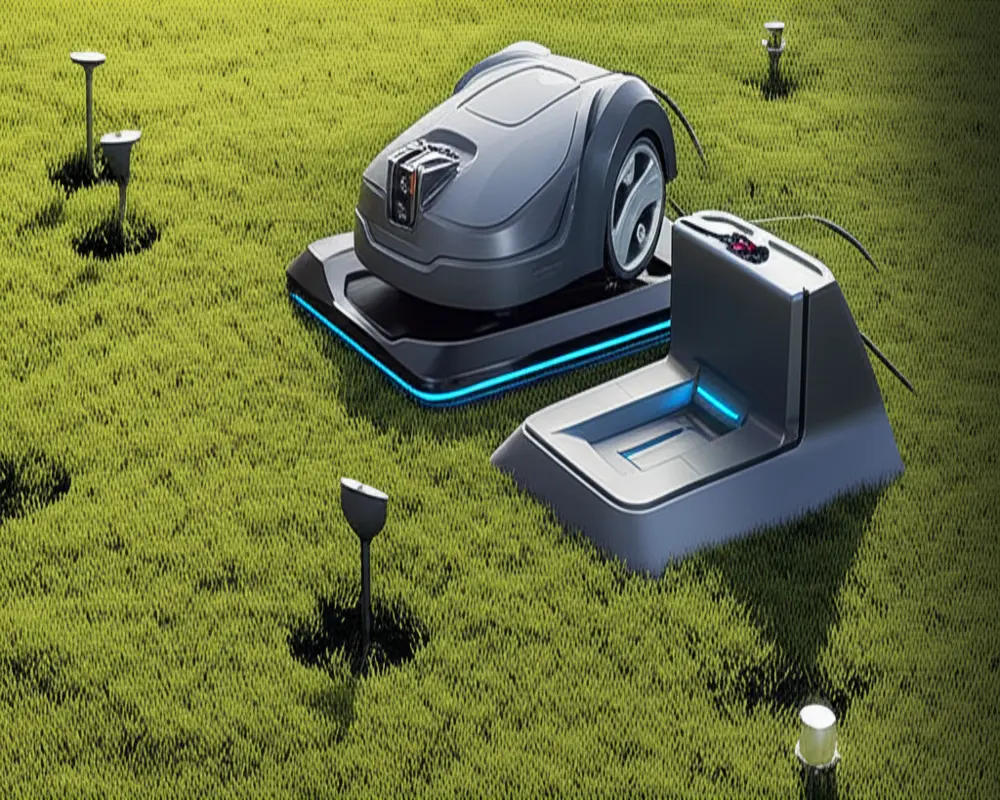
2. Install required antennas or reference equipment
Some models use a reference station, antenna, or boundary beacon. Place it according to the manual. A reference station may need:
- A clear view of the sky
- Stable mounting
- Protection from movement
- Reliable power
- A suitable distance from buildings or trees
A few inches of movement can change the mower’s mapped position.
3. Create the map
Use the mower app or control panel to map the lawn. Walk the mower around the edge if the system requires a guided mapping process.
Map:
- Main mowing zones
- No-go areas
- Narrow routes
- Temporary exclusion areas
- Charging routes
Keep the mower’s map separate from the property boundary. The mowing boundary should stay inside the legal property line and away from hazards.
4. Confirm the map manually
Do not trust the first map without checking it. Compare the digital map with the real yard. Look for places where the mower could reach:
- A road
- A neighbor’s lawn
- A pool
- A steep retaining wall
- A driveway
- A garden bed
- A playground
Run the first mowing session while watching the mower. Stop it if it approaches an unsafe area.

How to Set Up the App and Mowing Schedule
After the physical installation works, connect the mower to its app if the model uses one. Keep the mower near the charging station during setup unless the manual says otherwise.
Typical setup steps include:
- Install the official app.
- Create or sign in to an account if required.
- Pair the mower by Bluetooth, Wi-Fi, or another supported method.
- Install firmware updates only through the official app or manufacturer process.
- Name the mower and select the correct region.
- Confirm the time zone.
- Set mowing zones.
- Choose cutting days and hours.
- Set rain, frost, or weather delays if available.
- Enable security alerts and PIN protection.
Choose a safe mowing schedule
Start with short, supervised runs. This lets you find boundary errors before the mower operates alone.
Avoid scheduling when:
- Children play outside
- Pets roam freely
- Irrigation is running
- The lawn is saturated
- Severe weather is expected
- Yard workers are present
- The mower cannot be seen or safely reached
A robot mower cuts small amounts often. It usually works best when grass is dry enough for safe traction and when the schedule follows the manufacturer’s limits.
How to Install a Robot Mower on Slopes and Uneven Ground
A mower should operate on slopes only within its documented limit. The safe limit may differ between travel and mowing, and wet grass can reduce traction.
Before running the mower:
- Measure or estimate the slope using the method in the manual.
- Check for loose soil and exposed roots.
- Remove stones that could strike the blade.
- Keep the mower away from drop-offs.
- Add a physical barrier near retaining walls and water.
- Test steep areas while standing nearby.
Do not rely on the mower’s obstacle sensors to prevent a fall. Sensors can miss low edges, tall grass, shadows, wet surfaces, or abrupt changes in ground level.
If the mower repeatedly spins its wheels, slides, or stops on a slope, exclude that area. Do not increase the cutting height or change the schedule as a substitute for a safe boundary.
Common Robot Lawn Mower Installation Problems
Most first-day problems come from the boundary layout, station position, power supply, or a blocked route.
| Problem | Likely causes | First checks |
|---|---|---|
| Boundary error | Broken wire, loose terminal, wrong connection | Check station lights, terminals, and visible wire |
| Mower crosses the boundary | Incorrect clearance or wire placement | Compare the edge distance with the manual |
| Mower cannot find the station | Poor station alignment, blocked approach, guide-wire fault | Clear the approach and check station orientation |
| Mower stops in the lawn | Low battery, blocked blade, wheel obstruction, signal loss | Turn it off, inspect safely, and check the app |
| Mower avoids part of the lawn | Narrow route, incorrect map, exclusion loop | Review the map and test the passage |
| Mower gets stuck | Hole, rut, soft soil, low object, steep slope | Repair the surface or create a no-go area |
| Charging fails | Dirty contacts, moved station, power issue | Clean contacts and confirm the station is stable |
| App disconnects | Weak Wi-Fi, cellular, or Bluetooth signal | Move within range and check network requirements |
| Grass remains uncut | Schedule too short, zone not enabled, mower cannot reach area | Check zones, route access, and operating hours |
How to find a broken boundary wire
If the station reports a boundary fault:
- Turn off the mower and station as directed.
- Inspect the wire near the station first.
- Look for cuts from edging, digging, animals, or yard work.
- Check all connectors and splices.
- Test the system with the manufacturer’s wire tester if supplied.
- Repair the wire with the approved connector.
- Test the repair before covering it.
Do not connect random wires together with household tape. Moisture can enter the joint and cause another failure.
When to contact the manufacturer or an electrician
Contact the manufacturer when the mower repeatedly fails despite a correct layout, or when the app reports a hardware or battery fault.
Contact a qualified electrician when:
- The outdoor outlet is not suitable
- The outlet lacks required protection
- The power cord or adapter is damaged
- You need a new outdoor circuit
- The station must be hardwired
- You are unsure whether the installation follows local electrical code
Unplug the system before inspecting damaged electrical parts. Do not open a sealed power adapter.

Safety Rules for Robot Lawn Mower Installation
A robot mower is still a powered cutting machine. Its automatic operation does not remove the need for supervision and maintenance.
Follow these rules:
- Turn the mower off before lifting it.
- Remove or isolate the battery when the manual requires it.
- Keep hands and feet away from the blade area.
- Never reach under the mower while it is powered.
- Keep children and pets away during installation and testing.
- Remove toys, hoses, tools, and branches from the lawn.
- Do not mow near people who cannot see or avoid the mower.
- Stop the mower before clearing a blockage.
- Use only the approved charger and power adapter.
- Keep the station and connections clear of standing water.
- Do not operate it during storms unless the manufacturer specifically permits it.
- Use a physical barrier near pools, roads, stairs, and high drop-offs.
- Inspect the blades and wheels on the schedule in the manual.
The U.S. Consumer Product Safety Commission provides safety information for outdoor power equipment, and local electrical rules may apply to outdoor power connections. The mower manual remains the controlling source for model-specific operation.

How Long Does Robot Lawn Mower Installation Take?
A simple, open lawn may take a few hours to plan, wire, test, and secure. A complex lawn can take much longer because of multiple zones, gardens, slopes, and narrow passages.
The main factors are:
- Lawn size
- Boundary-wire length
- Number of exclusion loops
- Number of mowing zones
- Need for a guide wire
- Condition of the soil
- Station distance from the outlet
- App or GPS mapping requirements
- Time needed for supervised testing
Do not rush the testing stage. A quick installation that leaves one unsafe edge can create more work than a careful first setup.

Robot Lawn Mower Installation Checklist
Use this checklist before allowing the mower to run on its own.
Before installation
- Read the manual for the exact model.
- Confirm the mower’s lawn-area rating.
- Check slope and passage limits.
- Identify pools, roads, steps, and drop-offs.
- Repair holes, ruts, and exposed roots.
- Choose a stable station location.
- Confirm the power supply.
During installation
- Place the charging station level and straight.
- Connect the boundary wire correctly.
- Install exclusion loops where needed.
- Add the guide wire if required.
- Secure all wire with stakes.
- Install antennas or reference equipment correctly.
- Map wireless zones carefully.
Before autonomous mowing
- Test boundary detection.
- Test station departure and return.
- Check every narrow passage.
- Watch slopes and difficult turns.
- Confirm no-go areas.
- Set a supervised schedule.
- Keep children and pets away.
- Save a map of the wire layout.
Frequently Asked Questions
Can I install a robot lawn mower myself?
Yes, many homeowners can install a robot mower themselves. The work usually involves placing the station, laying boundary wire or mapping the yard, and testing the system. Hire a qualified professional for electrical work or a complex property that has steep slopes, multiple disconnected lawns, or difficult drainage.
Does boundary wire need to be buried?
Not always. Many manufacturers allow the wire to lie on the ground while it settles into the grass. Bury it only to the depth stated in the manual. Test the mower first so you do not bury a faulty layout.
Can a robot mower cross a driveway?
It may be able to cross a driveway if the model supports it and the route is mapped or wired correctly. The driveway must not create a dangerous step, excessive slope, or conflict with vehicles. Check the manual before allowing the mower to cross any hard surface.
Can a robot lawn mower work without Wi-Fi?
Some models can mow without Wi-Fi after setup. Others need Wi-Fi, cellular service, GPS correction, or an app for mapping and remote control. Basic mowing may continue during a connection loss, but alerts and remote functions may stop.
Should a robot mower run every day?
Many robot mowers are designed for frequent, short cutting sessions, but the correct schedule depends on grass growth, weather, local restrictions, and the manufacturer’s guidance. Start with a limited schedule and increase it only if the mower reaches all zones without damaging the lawn.
What should I do if the mower gets stuck often?
First inspect the exact spot for a hole, soft soil, root, low object, steep grade, or incorrect map. Repair the surface or mark the area as a no-go zone. Repeatedly changing the schedule will not fix a physical access problem.
Final Takeaway
To install a robot lawn mower, prepare the lawn, choose a safe charging-station location, install and test the boundary system or digital map, and supervise the first mowing sessions. The most important details are model-specific: edge clearances, wire depth, slope limits, guide-wire design, station alignment, and network requirements.
Start with visible wire or a simple test map. Confirm that the mower can leave, cut, turn, avoid hazards, and return to charge. Once the system works reliably, secure the final installation and record the layout for future repairs.


