
How To Set Up A Husqvarna Automower: Easy Guide
Introduction
Setting up a Husqvarna Automower in the United States usually takes three parts: prepare the lawn, install the charging station and boundary system, then complete the mower setup in the Automower Connect app or control panel. Most wired models need a boundary wire and a guide wire. Some newer models use satellite navigation and do not need physical wires.
The exact steps vary by model, lawn size, slope, and installation kit. Always use the manual for your specific Automower model before cutting or connecting wires. This guide explains the common setup process for U.S. homeowners, including safety checks, wire placement, app settings, testing, and troubleshooting.

What You Need Before Installing a Husqvarna Automower
Gather the mower, charging station, power supply, boundary wire, guide wire, connectors, stakes, and installation tools before you begin. Some packages include these parts. Others require a separate installation kit.
You may also need:
- A hammer or rubber mallet
- Wire cutters and wire strippers
- A tape measure
- A shovel or lawn edger
- A level
- A weatherproof outdoor outlet
- A smartphone with the Automower Connect app
- A Wi-Fi or cellular connection, if your model uses one
- Extra wire and connectors for complex lawns
Check the model manual for the correct wire type, connector type, transformer location, and maximum boundary length. Do not assume that parts from a different mower or installation kit will work.
Check the lawn first
Walk the full mowing area before installation. Remove or fix:
- Loose stones
- Toys
- Garden hoses
- Fallen branches
- Exposed roots
- Deep holes
- Low tree limbs
- Loose landscape fabric
- Wire, rope, and other small objects
A robotic mower can pass over some small items, but objects can damage the blade disc or become projectiles. The mower may also become stuck in holes or under low obstacles.
Mark areas that the mower must not enter. These may include:
- Vegetable gardens
- Flower beds
- Pools and ponds
- Steep drop-offs
- Swing sets
- Dog runs
- Gravel areas
- Mulch beds
- Temporary holiday decorations
The boundary system keeps the mower inside its work area. It does not replace physical protection around a pool, retaining wall, or dangerous drop-off.
Check power and signal conditions
Choose an outdoor outlet with a suitable weatherproof cover. The outlet should be protected according to local electrical rules. Do not use a damaged extension cord or place the transformer where water can collect.
For a wired system, inspect the lawn for areas that could damage the cable. Avoid sharp edging tools, deep aeration, and future digging near the wire path.
For a wire-free model, check the conditions needed for satellite positioning. Tall buildings, dense tree cover, steep slopes, and narrow passages can affect signal quality. The model’s manual and Husqvarna support materials determine whether your property is suitable.

Where to Place the Charging Station
Place the charging station on a flat, stable surface with a clear approach in front of it. The mower must be able to leave and return without hitting a wall, fence, tree, or garden border.
A good location usually has:
- A firm and level base
- A clear path into the station
- Access to the power supply
- Protection from frequent flooding
- Adequate satellite or radio signal, when required
- Enough room for the mower to turn and align
Do not hide the station behind a tight corner. Do not place it on a steep slope unless the manual allows it. A poor station location can cause failed docking, charging errors, or repeated stops.
Use the measurements in your model manual for open space around the station. Husqvarna uses different layouts for different Automower models and installation systems.
Secure the station
Set the charging station in its final position. Use the supplied screws or ground anchors to hold it in place. The station must not move when the mower enters or leaves.
Connect the boundary and guide wires only after you confirm the station position. Leave enough extra wire near the station to make a clean connection and allow small adjustments.
Do not connect the transformer to power until the wiring is complete and checked. Keep electrical connections dry and follow the instructions supplied with the transformer.
How to Install the Boundary Wire
The boundary wire creates a closed loop around the mowing area. The mower detects the signal from this loop and turns away before leaving the lawn.
Lay the wire on the ground and secure it with stakes, or place it just below the surface if your installation instructions allow it. Do not bury it deeply. A wire that is too deep can weaken the signal and become difficult to repair.
Keep the wire at the correct distance
The correct distance from an edge depends on the surface and the Automower model. Use the supplied ruler, manual, or installation guide rather than a universal measurement.
As a general planning rule:
- Keep more space beside a drop-off.
- Use less space beside a level paved surface only when the model allows it.
- Leave enough room beside a fence for the mower to avoid contact.
- Increase the distance around shrubs, walls, and raised borders.
- Keep the wire away from large metal objects when the manual requires it.
The mower may leave a narrow strip of grass near some edges. This is normal. You can trim that strip with a string trimmer or lawn mower.
Create islands around obstacles
Use the boundary wire to create an island around a permanent obstacle, such as a tree, flower bed, or pond. Run the wire from the outer boundary to the obstacle, around the obstacle, and back along the same route.
The outgoing and returning wires should lie close together. When installed correctly, their signals cancel in that section. The mower can then cross the path to reach the rest of the lawn.
Do not create an island around every small object. Use islands for fixed objects that will stay in place. Remove movable items before each mowing cycle.
Handle separate lawn areas
A standard wired Automower setup works best when all mowing areas connect through a route the mower can use. A narrow passage may need careful wire placement.
If two lawn areas do not connect, the mower may not travel between them. You may need to carry the mower to the second area and use a separate mowing schedule, or use a model and installation method designed for multiple work areas.
Do not connect two separate loops in an improvised way. Follow the model manual or ask an authorized Husqvarna service dealer for the correct layout.

How to Install the Guide Wire
The guide wire helps the mower find its way back to the charging station. It runs from the station through the work area and connects with the boundary system at the point specified by the manual.
A guide wire is especially useful on lawns with:
- Narrow passages
- Several sections
- Long travel distances
- Slopes
- Areas far from the charging station
- Difficult docking approaches
Lay the guide wire in a path that gives the mower a clear route home. Avoid sharp turns and areas where water collects. Keep the wire flat and secure it with stakes.
The guide wire must connect to the charging station and boundary loop in the correct terminals. A wrong connection can produce a boundary fault or prevent the mower from finding the station.
When the wiring is complete, inspect the entire loop. Look for:
- Cuts
- Loose connections
- Crossed wires
- Pinched sections
- Unsecured bends
- Wire placed too close to a hazard
- Wire that could be cut by an edger or aerator
How to Connect and Test the Wire System
After installing the wires, connect them to the charging station as shown in the manual. The charging station normally displays a steady status light when the loop is complete and working.
A warning light or error message often indicates one of these problems:
- A broken boundary wire
- A loose connector
- A guide wire connected to the wrong terminal
- A poor connection at the charging station
- A wire placed outside the required signal area
- Electrical interference
- A damaged charging station
Disconnect power before changing wiring. Never handle exposed electrical connections in wet conditions.
If the station reports a loop problem, check the connectors first. Then inspect the wire near areas where you drove a stake, edged the lawn, installed landscaping, or used a lawn aerator.
Some Husqvarna installation kits include a loop tester. Use it according to the tester instructions. If you cannot find the break, an authorized dealer can help trace the signal.

How to Pair the Automower With the App
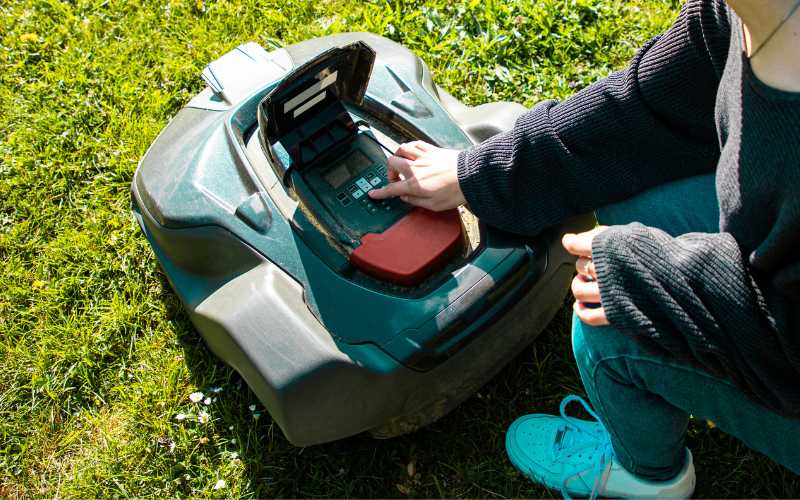
Many Husqvarna Automower models use Automower Connect. The app can provide mower control, schedule changes, status alerts, map features, and settings. The available functions depend on the model, communication kit, subscription or service plan, and local network or cellular coverage.
To connect the mower:
- Charge the mower in the station.
- Turn the mower on.
- Install the official Automower Connect app.
- Create or sign in to your Husqvarna account.
- Add the mower using the instructions in the app.
- Enter the mower’s pairing code or scan the required code.
- Keep the phone close to the mower during Bluetooth pairing.
- Complete any firmware update shown by the app.
- Confirm that the app can start, stop, and report the mower status.
Some models use Bluetooth only for nearby control. Others support cellular or Wi-Fi features. Do not assume that every Automower has the same remote-control options.
If the app cannot find the mower, check Bluetooth, phone permissions, mower power, account access, and the model’s communication requirements. Restart the app and mower only after saving any required settings.
How to Set the Mowing Schedule and Cutting Height
Set the schedule based on grass growth, lawn size, weather, and the mower’s capacity. The mower does not need to run continuously. It cuts small amounts of grass at a time and returns to charge when needed.
A simple starting method is:
- Set a short schedule.
- Watch the lawn for several days.
- Increase or reduce the schedule as needed.
- Keep the mower off the lawn during watering, outdoor play, and maintenance.
If uncut grass remains, the mower may need more operating time, a better route, or a different work-area setting. If the lawn looks stressed or the mower creates visible tracks, reduce the schedule or change the starting points.
Set the cutting height higher at first, especially if the grass is tall. Lower the height in small steps after the mower is working normally. Cutting too much grass at once can overload the mower and leave clumps.
Do not use the Automower as a first cut for tall grass. Mow the lawn with a conventional mower first, then set the Automower to maintain the desired height.
How to Create Work Areas and Stay-Out Zones
Some Automower models allow digital work areas or stay-out zones. These functions may use GPS, satellite positioning, a boundary map, or other model-specific technology.
Use work areas when one lawn needs different schedules or cutting priorities. For example, a front lawn may need a different schedule from a back lawn.
Use stay-out zones for temporary or seasonal areas such as:
- Children’s play equipment
- New seed
- A temporary pool
- Outdoor furniture
- Fresh mulch
- A garden area under repair
A digital zone may not work the same way as a physical barrier. Follow the model instructions and verify the zone by running the mower under supervision.
For ponds, steep edges, roads, and other serious hazards, use a physical boundary or barrier when needed. Software settings should not be the only protection against a dangerous fall.
How to Test the First Mowing Cycle
Stay nearby during the first full test. Watch how the mower leaves the station, follows the boundary, crosses narrow passages, avoids obstacles, and returns to charge.
Check these signs of a successful setup:
- The mower stays inside the intended work area.
- It reaches all important lawn sections.
- It does not become stuck in corners.
- It returns to the charging station.
- The station reports normal operation.
- The blades run only while the mower is in a suitable mowing area.
- The mower avoids restricted zones.
Stop the mower if it reaches a hazard or behaves unexpectedly. Use the control panel or app to stop it, then move it safely according to the manual.
Adjust wire positions only after switching off the mower. A small change near a tight passage can improve performance, but moving one part of the loop may affect another part of the lawn.
Common Husqvarna Automower Setup Problems
The mower leaves the lawn
Possible causes include a broken boundary loop, incorrect wire placement, a loose connector, or a boundary setting that does not match the installation.
First, stop the mower. Check the charging station status light and inspect the boundary wire. Repair the loop with approved connectors. Do not twist wires together and cover them with ordinary tape.
The mower will not leave the station
Check that the mower is charged, the schedule is active, and no alarm or PIN lock is blocking operation. Confirm that the station has power and that the guide wire is connected correctly.
A mower may also remain in the station when the schedule does not permit mowing or when weather-related settings delay operation.
The mower cannot find the charging station
Check the guide wire path and the space in front of the station. Look for a pinched wire, a sharp turn, a blocked route, or a station that moved.
If the mower repeatedly passes the station, verify the guide wire connection and the station’s alignment. Follow the manual’s required guide settings for your model.
The mower gets stuck
Look for holes, roots, soft soil, steep transitions, narrow passages, and low objects. Fill holes and remove obstacles. Adjust the boundary wire only when the manual allows it.
If the mower becomes stuck in the same place, create a stay-out zone or change the route. Do not leave a repeated trap in place and hope the mower will eventually solve it.
The mower cuts poorly
Inspect the blades and cutting disc with the mower switched off. Wear gloves when handling blades. Replace dull, bent, or damaged blades with the correct parts.
Also check the cutting height and schedule. Tall or wet grass may require a higher setting and a longer adjustment period.
Maintenance After Setup
A good setup still needs routine care. Before cleaning or servicing the mower, switch it off and follow the model’s safety instructions.
Regular tasks include:
- Cleaning grass from the wheels and cutting deck
- Checking the blades
- Replacing damaged blades
- Inspecting the charging contacts
- Checking the boundary wire after yard work
- Keeping the station clear
- Updating software when appropriate
- Removing the mower during severe weather when the manual advises it
Do not use a pressure washer unless Husqvarna specifically permits it for your model. Water can damage electronics and charging contacts.
After landscaping, edging, aeration, trenching, or fence work, inspect the wire path. Many wire breaks happen after later yard projects rather than during the original installation.
Store the mower and battery according to the model manual during long periods of freezing weather. Battery care and winter storage instructions differ by model.
Quick Takeaways
- Read the manual for the exact Automower model before installation.
- Inspect and clear the lawn first.
- Place the charging station on level ground with a clear approach.
- Install the boundary wire as a complete loop.
- Use the guide wire to improve return-to-station performance.
- Test the system while you are nearby.
- Keep people, pets, and objects away from the mower during setup.
- Turn the mower off before handling blades, wires, or electrical parts.
- Use physical barriers for serious hazards such as pools and drop-offs.
- Ask an authorized Husqvarna dealer for help with complex wiring or repeated electrical faults.
Frequently Asked Questions
Does a Husqvarna Automower need Wi-Fi?
No. The mower itself can operate with its installed boundary system and control panel, depending on the model. Wi-Fi, Bluetooth, or cellular service may be needed for specific app functions, remote control, alerts, or map features.
Can I install an Automower boundary wire under the ground?
Usually, yes, when installed at the depth and location allowed by the model manual. A shallow installation is easier to repair. Avoid burying the wire too deeply because the signal may weaken and future repairs may become difficult.
Can I use an Automower on a sloped lawn?
Many models can handle slopes, but the allowed slope and performance depend on the model and surface conditions. Wet grass, loose soil, and steep transitions can reduce traction. Check the manufacturer’s slope limit for your exact model.
How long does it take to install a Husqvarna Automower?
A simple lawn may take a few hours, including wire placement and testing. A large lawn with islands, narrow passages, slopes, or several zones may take longer. The main time factors are lawn shape, wire length, obstacle count, and whether the wire is staked or buried.
Can the Automower cut wet grass?
The answer depends on the model and weather conditions. Wet grass can reduce traction, clog the cutting area, and increase wear. Use the model manual and weather settings as the guide. Avoid mowing during storms and keep the charging station and electrical connections dry.
Do I need a professional installation?
Not always. Many homeowners can install a wired system on a simple, open lawn. Professional help may be useful for complex properties, multiple connected areas, difficult slopes, buried utilities, repeated wire faults, or wire-free systems that need a careful signal survey.
Conclusion
The best way to set up a Husqvarna Automower is to treat the installation as a lawn-layout project, not just a mower connection. Clear the lawn, place the charging station correctly, install the boundary and guide wires with care, then test every part of the route.
Use the manual for model-specific measurements, app features, slope limits, and wiring rules. Once the mower can leave, cut, avoid hazards, and return to charge without help, fine-tune the schedule and cutting height over the next several mowing cycles.


