
How To Build A GPS Guided Robot: Easy DIY Guide
A GPS-guided robot uses satellite position data, wheel or motor feedback, and software to move toward set points. In the United States, you can build one for a private yard, farm, research area, or outdoor test course with a small rover chassis, a microcontroller or single-board computer, a GPS receiver, motor drivers, and a safe control program.
The most reliable design does not use GPS alone. GPS tells the robot where it is, while wheel encoders measure motion, an inertial measurement unit helps track direction, and software combines all three sources. For basic outdoor driving, a standard GPS receiver may be enough. For repeatable paths within a few inches, use an RTK-capable GNSS system.

What a GPS-guided robot does
A GPS-guided robot follows geographic waypoints. A waypoint is a stored latitude and longitude that marks a destination, such as the corner of a field or the center of a test area.
The robot repeats this basic cycle:
- Read its current position.
- Compare that position with the next waypoint.
- Calculate the distance and direction to the waypoint.
- Turn toward the target.
- Drive forward.
- Slow down or stop when it reaches the waypoint.
- Move to the next waypoint.
GPS is often called GNSS because modern receivers may use several satellite systems, including GPS, Galileo, GLONASS, and BeiDou. GPS is the U.S. system, while GNSS is the broader technical term.
A robot that only knows latitude and longitude can reach a point, but it may not steer smoothly. The robot also needs a heading estimate. Heading is the direction the robot is facing.
GPS accuracy levels
The receiver type sets the practical accuracy of the robot.
| Position source | Typical use | Practical limitation |
|---|---|---|
| Standard GPS or GNSS | Large outdoor routes and simple waypoint tests | Position can shift by several feet |
| Multi-band GNSS | Better outdoor stability | Still affected by trees, buildings, and reflections |
| RTK GNSS | Repeatable paths and precision field work | Needs correction data and careful setup |
| RTK with a base station | Local precision over a defined work area | Base station must remain fixed and have a good sky view |
These ranges are general design expectations, not guaranteed results. Real accuracy depends on the receiver, antenna, satellite view, correction service, weather, nearby structures, and software.
GPS.gov explains that civilian GPS accuracy varies with the receiver and conditions. For a robot, the key lesson is simple: a GPS coordinate is an estimate, not a perfect point on the ground.
Parts you need
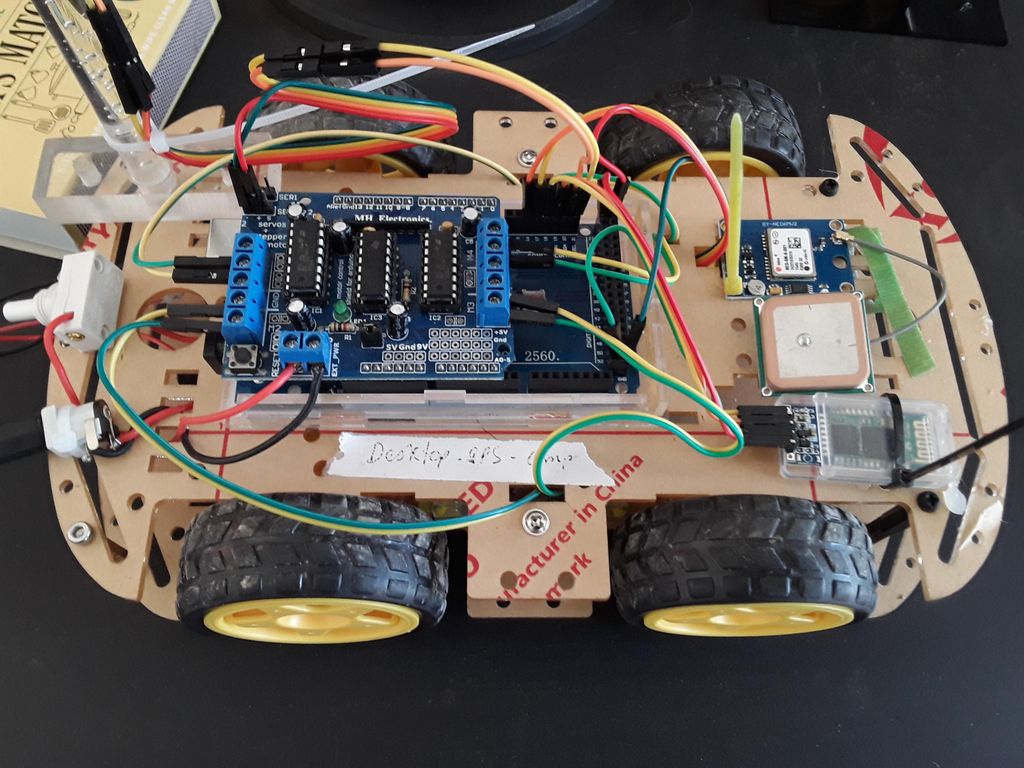
A small outdoor rover can be built from common robotics parts. Select the parts as a system because motor voltage, battery current, logic voltage, and software support must match.
Core hardware
You will usually need:
- A two-wheel-drive or four-wheel-drive robot chassis
- Two or four geared DC motors
- Wheel encoders
- A dual-channel motor driver
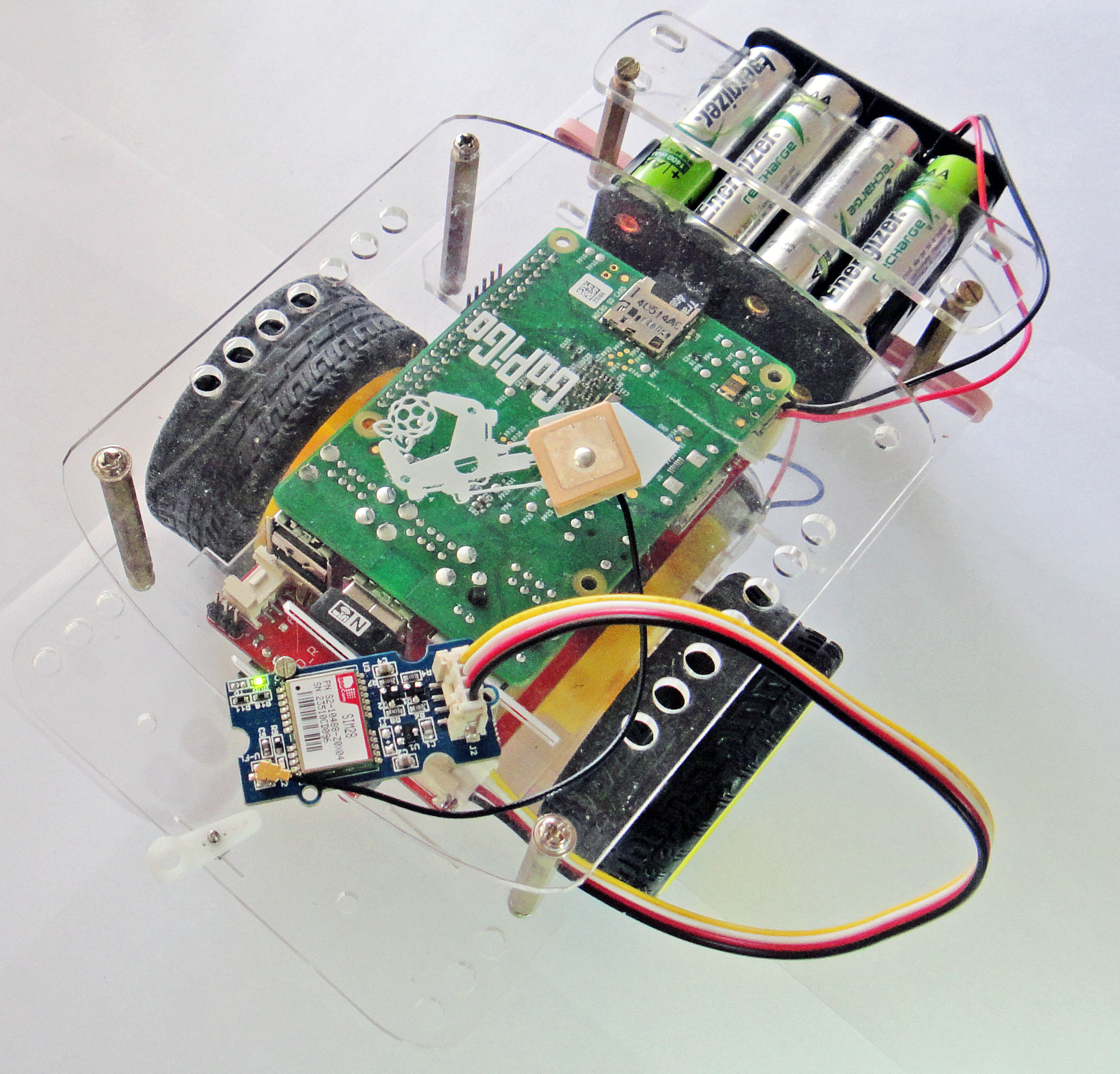
- A microcontroller or single-board computer
- A GPS or GNSS receiver
- A GNSS antenna
- An IMU with accelerometer and gyroscope
- A compass or magnetometer, if suitable for the environment
- A rechargeable battery
- A power switch and fuse
- A voltage regulator or power distribution board
- Emergency stop hardware
- Bumpers or physical guards
- Waterproof enclosures and cable glands for outdoor use
A two-wheel differential-drive chassis is the easiest starting point. The robot turns by changing the speed of the left and right wheels. A four-wheel platform can carry more weight, but it adds friction, current demand, and mechanical complexity.
Choosing the computer
Use a microcontroller when you need:
- Fast motor control
- Simple waypoint logic
- Low power use
- Quick startup
- Reliable timing
Use a single-board computer when you need:
- Python or C++ robotics software
- Maps or a user interface
- Data logging
- Camera processing
- ROS 2 or Nav2
- Network access for RTK corrections
A common design uses both. The single-board computer plans the route, while the microcontroller handles motor timing and safety. This division keeps the motors under control if the computer freezes or loses its network connection.
GPS receiver and antenna
Choose a receiver that provides standard NMEA output or another documented serial data format. A receiver with a clear outdoor view works much better than one placed inside a metal box.
Mount the antenna:
- High on the robot
- Away from motor wires and switching power supplies
- Level with the ground
- Clear of large metal parts
- Secure enough that it cannot move during turns
Do not assume that a more expensive receiver will solve every navigation problem. Poor antenna placement, tree cover, multipath reflections, and weak heading logic can still cause errors.
Motors, drivers, and battery
Size the motor driver for the motor’s stall current, not only its normal running current. A motor can draw much more current when it starts, stops, or hits an obstacle.
For a simple load estimate:
Battery power = Battery voltage × Average current
For example, a hypothetical 12-volt robot that draws 4 amps while driving uses about:
12 V × 4 A = 48 W
This is only an operating estimate. Starting current, slopes, grass, mud, and blocked wheels can raise the demand sharply.
Add a fuse near the battery. Use wire sizes that match the expected current and keep motor power wiring separate from sensitive GPS and sensor wiring.
Plan the robot before building it
Start with the job, not the parts list. A robot that drives between four points in a clear field needs less hardware than one that works near trees or follows a narrow garden row.
Write down:
- The surface: pavement, soil, gravel, grass, or sand
- The route size
- The target position accuracy
- The maximum speed
- The expected run time
- The slope
- The obstacles
- The weather exposure
- Whether a person will supervise it
- Whether the robot must stop when communications fail
Choose a realistic accuracy goal
Match the goal to the navigation method.
- If the robot only needs to reach a large area, standard GNSS may work.
- If the robot must follow a path within a few feet, add wheel encoders and an IMU.
- If it must return to nearly the same line each time, consider RTK GNSS.
- If it must avoid people, vehicles, or unknown objects, GPS is not enough. Add obstacle sensors and supervised operation.
Do not use GPS waypoint control as a substitute for obstacle detection. GPS can tell the robot that it is near a location. It cannot tell the robot that a child, dog, vehicle, fence, or hole is in its path.
Draw the electrical layout
Before connecting wires, make a simple block diagram:
Battery
  ├── Fuse ── Power switch ── Motor driver ── Motors
  ├── Regulator ── Computer
  └── Regulator ── Microcontroller and sensors

Computer ── Serial, USB, or CAN ── Microcontroller
GPS ────── Serial or USB ───────── Computer
IMU ────── I2C or SPI ─────────── Computer or microcontroller
Encoders ─ GPIO, timer input, or encoder interface
Emergency stop ─ Motor power or safety-control input
Check the voltage of every module. Many sensors use 3.3-volt logic, while some motor drivers and older boards use 5-volt logic. A wrong voltage can damage a board.
Assemble the mechanical system
Build the drive base before adding navigation software. The robot should move straight and turn reliably under manual control.
Step 1: Build a rigid chassis
Mount the motors firmly and keep the drive wheels aligned. A loose motor mount can change the wheel angle and make the robot appear to have a software problem.
Place heavy parts low and near the center. Keep the battery secure. A shifting battery changes the balance and can pull wires loose.
Protect the GPS antenna from vibration. Keep it away from the motor driver and high-current cables.
Step 2: Install wheel encoders
Wheel encoders report how far each wheel turns. If the left wheel moves faster than the right wheel, the robot curves. Encoders let the controller correct this difference.
Record:
- Wheel diameter
- Wheel spacing
- Encoder counts per motor revolution
- Gear ratio
- Counts per wheel revolution
A basic distance calculation is:
Distance per count =
Wheel circumference ÷ Counts per wheel revolution
If a wheel has a 0.20-meter circumference and produces 1,000 counts per revolution:
0.20 m ÷ 1,000 = 0.0002 m per count
This is a hypothetical example. Measure the actual wheel and encoder system because gearboxes and quadrature decoding can change the count.
Step 3: Add a manual drive mode
Before GPS control, make the robot drive by remote control or a wired command. Test:
- Forward
- Reverse
- Left turn
- Right turn
- Stop
- Slow speed
- Motor direction
- Emergency stop
If the robot cannot drive safely by manual control, autonomous navigation will not fix it.
Wire the sensors and test each one
Bring up one component at a time. This makes faults easier to find.
Test the GPS receiver
Place the robot outdoors with a clear view of the sky. Confirm that the receiver reports:
- Latitude
- Longitude
- Fix status
- Number of satellites or navigation data
- Position quality information
- Time
Let the receiver sit still and record its reported position for several minutes. Plot the points or calculate their spread. If the points move while the robot is still, the navigation software must tolerate that movement.
This stationary test is more useful than trusting a single accuracy number on a product page.
Test the IMU and compass
An IMU measures motion and rotation. A magnetometer can provide a magnetic heading, but it is sensitive to:
- Motors
- Steel frames
- Battery cables
- Speakers
- Power converters
- Fences and vehicles
Calibrate the sensor in the final mounting position, not on a workbench. If the compass heading changes when the motors run, move the sensor or use another heading method.
A useful alternative is course-over-ground from GNSS. It works when the robot is moving, but it is unreliable when the robot is stopped or moving very slowly.
Test the encoders
Lift the drive wheels safely or use a test stand. Turn each wheel and confirm that:
- Counts increase in the expected direction
- Left and right channels are separate
- Counts do not jump randomly
- The measured distance matches the real distance
Then test on the ground. Wheel slip can make encoder distance differ from the robot’s true position.

Write the navigation software
The software should have separate layers. This makes it easier to replace a sensor or improve the steering method later.
Layer 1: Sensor input
Read and timestamp:
- GNSS position
- GNSS quality status
- IMU data
- Wheel encoder counts
- Battery voltage
- Emergency-stop state
- Obstacle sensor state
Reject clearly invalid data. For example, do not steer toward a waypoint if the GPS receiver has lost its fix or reports a corrupted message.
Layer 2: Position and heading estimate
Convert latitude and longitude into a local coordinate system. For a small work area, a local east-north coordinate frame is easier to use than raw geographic degrees.
One common approach is:
- Choose a local origin near the start point.
- Convert latitude and longitude into local north and east distances.
- Run navigation in meters.
- Convert back to latitude and longitude only when needed.
For larger areas, use a suitable projected coordinate system or a robotics localization package.
Fuse the sensors when possible. Wheel encoders provide short-term motion data. GNSS provides long-term position correction. The IMU helps estimate turns between position updates.
A Kalman filter or an established robotics localization package can combine these inputs. If you are new to sensor fusion, first build a working system with clear sensor logs. A simple, observable system is better than a complex filter that you cannot debug.
Layer 3: Waypoint manager
Store waypoints as:
[
  {latitude: ..., longitude: ...},
  {latitude: ..., longitude: ...},
  {latitude: ..., longitude: ...}
]
The waypoint manager should:
- Select the active waypoint.
- Calculate distance to it.
- Check whether the robot is inside the arrival radius.
- Advance to the next point.
- Stop at the final point.
The arrival radius must be larger than normal GPS noise. If a standard receiver shifts by several feet while stationary, a tiny arrival radius may cause the robot to circle the target forever.
Layer 4: Steering control
For a differential-drive robot, calculate the desired bearing to the waypoint and compare it with the current heading.
Normalize the heading error to the range from -180 degrees to +180 degrees:
Heading error = Desired heading − Current heading
Then wrap the result so the robot chooses the shorter turn.
A simple controller can use proportional control:
Turn command = Steering gain × Heading error
Limit the turn command to the motor driver’s safe range. Reduce forward speed when the heading error is large.
A practical rule is:
- Large heading error: turn slowly or stop one wheel.
- Small heading error: drive forward with a mild correction.
- Near the waypoint: slow down.
- Invalid GPS or unsafe sensor state: stop.
Do not tune the controller at full speed. Start slowly in an empty area.
Layer 5: Safety supervisor
The safety layer should have authority over navigation. It should stop the robot when:
- The emergency stop is pressed
- The battery is too low
- GPS quality falls below the chosen limit
- The robot leaves its geofence
- The computer stops sending commands
- An obstacle is detected
- A motor draws abnormal current
- The robot tips or loses a required sensor
A software stop is useful, but a physical emergency stop is better. Test the stop while the wheels are turning.

Add geofencing and obstacle detection
A geofence is a virtual boundary that the robot must not cross. Use one even on private property.
A basic geofence can be:
- A rectangle
- A circle
- A polygon around the work area
The robot should stop before the boundary, not exactly on it. Leave a buffer for GPS error, braking distance, and wheel slip.
Obstacle detection needs a separate sensor system. Possible choices include:
- Ultrasonic sensors for short-range detection
- Infrared sensors for simple close objects
- LiDAR for distance scans
- Cameras for visual detection
- Bumper switches for physical contact
Each option has limits. Ultrasonic sensors can struggle with soft or angled objects. Cameras need lighting and software. LiDAR can miss some surfaces or lose performance in dust, rain, or bright conditions.
Use more than one protection method when the robot can approach people or valuable property. Keep a person close during early tests.
Configure the robot for outdoor testing
Use a controlled test site in the United States, such as a private yard or designated work area where you have permission to operate. Do not test an autonomous robot on public roads, sidewalks, or areas where it could interfere with traffic or pedestrians.
Start with this sequence:
- Put the robot on blocks and test motor direction.
- Drive it manually at low speed.
- Test the emergency stop.
- Record GPS data while stationary.
- Drive a straight line manually.
- Compare encoder distance with measured distance.
- Test a single nearby waypoint.
- Add a second waypoint.
- Test a small square route.
- Expand the route only after the robot stops correctly.
Mark the test area with visible cones. Keep the route short. A small error is easier to understand than a large error several hundred feet away.
Signs of a working system
A GPS-guided robot is ready for a larger test when it:
- Starts and stops predictably
- Reports a valid position
- Holds a stable heading while moving
- Corrects small left and right errors
- Reaches a waypoint without tight circles
- Stops when GPS data becomes invalid
- Stops when the emergency switch is pressed
- Stays inside the geofence
- Logs enough data to explain failures
Troubleshoot common GPS robot problems
The robot drives in circles
Possible causes include:
- Reversed compass direction
- Incorrect left or right motor sign
- Heading measured in the wrong angle convention
- Incorrect wheel spacing
- GPS noise near the waypoint
- Steering gain set too high
- Arrival radius set too small
First test motor direction and heading with the robot stationary. Then use a large arrival radius and a low steering gain. A robot that circles only near the waypoint often needs better arrival logic rather than more motor power.
The robot follows a curved path
Possible causes include:
- Unequal motor speeds
- Different wheel diameters
- Misaligned wheels
- Encoder scale errors
- Wheel slip
- Unequal battery or motor performance
Use encoder feedback to balance the wheels. Measure the actual distance traveled by each side. Do not assume two motors are identical.
The GPS position jumps
Possible causes include:
- Trees or buildings blocking the sky
- Reflected signals near metal structures
- Poor antenna placement
- Weak fix quality
- Electrical noise
- A receiver with no correction service
Move the antenna to an open position and log the position while still. If repeatability matters, evaluate a multi-band or RTK receiver. RTK improves position precision only when the correction link, antenna, and setup work correctly.
The robot points the wrong way
A compass is not always a reliable heading source on a small robot. Motors and current cables can disturb it.
Check:
- Magnetic calibration
- Sensor orientation
- Motor interference
- Declination handling
- Whether the software expects degrees clockwise from north
- Whether the robot uses radians or degrees
Test heading while the motors are off and on. If the value changes sharply under motor load, relocate the sensor or use encoder and GNSS course data.
The robot stops before reaching the waypoint
Possible causes include:
- Arrival radius too large
- GPS position bias
- Low battery protection
- Geofence buffer
- A false obstacle reading
- A waypoint conversion error
Log the reason for every stop. A message such as STOP: obstacle or STOP: GPS invalid is far more useful than a silent motor shutdown.

Improve accuracy and reliability
The largest improvement usually comes from better system design, not from a single software trick.
Use RTK when repeatability matters
RTK uses correction data to improve GNSS positioning. A base station may broadcast corrections directly, or the receiver may receive them through an internet service such as NTRIP.
RTK introduces new requirements:
- A compatible rover receiver
- A correction source
- A stable data link
- Correct antenna setup
- A way to detect fixed, float, and invalid solution states
Do not treat an RTK receiver as accurate simply because it reports a position. Your software should check the solution status and stop or reduce speed when the high-precision state is lost.
Improve heading estimation
For a slow robot, heading can come from:
- A calibrated magnetometer
- Two GNSS antennas
- GNSS course over ground
- Wheel encoders and an IMU
- A fused localization system
Dual-antenna GNSS can provide heading while stationary, but it costs more and requires careful antenna spacing and configuration. For a basic rover, encoder and IMU fusion may be a practical starting point.
Slow down near turns and targets
Speed increases stopping distance and makes position errors harder to correct. Use a speed schedule:
If distance to waypoint is large:
    Use normal speed

If heading error is large:
    Reduce speed

If distance to waypoint is small:
    Use crawl speed

If inside arrival radius:
    Stop
The best speed depends on the surface, wheel size, motor response, and control loop. Measure it on the actual robot.

Safety and legal boundaries in the United States
Operate the robot only where you have permission and where people, animals, vehicles, and property are protected. A private test area is safer than a public path.
Follow these rules:
- Keep a clear line of sight during testing.
- Use a physical emergency stop.
- Never test near public traffic.
- Keep the robot away from children and pets.
- Use a fuse and protected battery enclosure.
- Charge lithium batteries with a suitable charger.
- Do not leave a powered robot unattended.
- Add a low-battery stop.
- Use a geofence with a safety margin.
- Protect exposed gears and wheels.
- Keep water away from electronics unless the enclosure is rated for it.
- Check local rules before operating on a farm, campus, park, or shared property.
Radio equipment, remote-control transmitters, cameras, and cellular links may be subject to U.S. Federal Communications Commission rules. Use certified radio modules and follow their operating instructions. If the robot will be used for paid work, public operation, or near aviation activity, obtain appropriate local guidance before deployment.
A GPS-guided robot should not be used for life-critical work without a formal safety design, hazard analysis, redundant controls, and qualified engineering review.
Example build configuration
The following is a reasonable learning platform, not a universal parts list:
- Two-wheel differential-drive chassis
- Two 12-volt geared motors
- Quadrature encoders
- Dual-channel motor driver rated above measured stall current
- Microcontroller for motor control
- Single-board computer for navigation and logging
- USB or serial GNSS receiver
- External GNSS antenna
- IMU mounted near the robot’s center
- 12-volt battery with fuse
- 5-volt regulator for computing hardware
- Physical emergency stop
- Bumper switches or short-range obstacle sensors
Use manual control first. Then add encoder speed control, followed by GPS waypoint control. Add RTK only after the basic platform can drive and stop reliably.
This staged approach saves time. It prevents you from blaming GPS for a mechanical, wiring, or motor-control problem.
Useful software choices
You can write a small custom program for a simple rover, or use a robotics framework.
A custom program may be enough for:
- A few waypoints
- Slow speeds
- A clear test field
- Basic logging
- No complex obstacle map
A framework such as ROS 2 with Nav2 may be more suitable when you need:
- Sensor fusion
- Map-based navigation
- Path planning
- Multiple sensors
- Visualization
- Reusable navigation components
ArduPilot Rover is another established option for users who prefer a ready-made autopilot structure. Review the current documentation for supported hardware, setup steps, safety configuration, and firmware behavior before selecting it.
Useful official references include:
- GPS.gov: GPS accuracy and performance
- ROS 2 documentation
- Navigation2 documentation
- ArduPilot Rover documentation
- Federal Communications Commission
Software changes over time. Check the documentation for the exact board, firmware version, operating system, and receiver model you plan to use.
Key takeaways
- Build the robot as a manual rover before adding GPS.
- Use GNSS for position, encoders for wheel motion, and an IMU for motion estimates.
- Standard GPS is useful for broad outdoor navigation but may not repeat a path closely.
- Use RTK GNSS when the project needs repeatable, high-precision positions.
- Add a geofence, obstacle detection, low-battery protection, and a physical emergency stop.
- Test outdoors in small steps and log every sensor and stop event.
- Do not operate an autonomous robot on public roads, sidewalks, or near uncontrolled people and traffic.
Frequently asked questions
Can I build a GPS-guided robot with an Arduino?
Yes. An Arduino-class microcontroller can read a GPS receiver, control motors, and follow simple waypoints. It may have limited memory and processing power, so use a separate computer if you need mapping, cameras, advanced sensor fusion, or RTK network services.
How accurate is a normal GPS robot?
A normal consumer GNSS receiver may show position changes of several feet while it remains still. Actual performance depends on the receiver, antenna, sky view, nearby structures, and software. Test the receiver at your work site before choosing the waypoint radius.
Does a GPS robot need a compass?
Not always. A compass can provide heading, but motors and metal parts can distort it. A moving robot can estimate course from GNSS, while encoders and an IMU can estimate turns. For the best result, combine several sources and monitor their quality.
Can GPS guide a robot indoors?
Usually not. GPS signals are weak indoors and often unavailable. Indoor robots normally use wheel odometry, cameras, LiDAR, beacons, visual markers, or other local positioning methods.
What is the best GPS module for a robot?
The best receiver depends on the needed accuracy, correction access, antenna location, software support, and budget. Choose a documented GNSS receiver that provides quality status and works with your computer or autopilot. Do not choose by accuracy claims alone; test the complete antenna and correction setup.
Conclusion
The most dependable GPS-guided robot is built in layers. Start with a stable chassis and safe motor control. Add encoders and an IMU. Then add GNSS waypoints, geofencing, obstacle detection, and data logging.
For a basic outdoor rover, standard GNSS may be enough. For repeatable field paths, RTK can provide a stronger position reference, but it does not replace safe control or obstacle sensing. Build slowly, test on private property, and make the robot stop whenever its position, power, communication, or surroundings become uncertain.


