


The John Deere L110 lawn tractor is a reliable mower, but like any machine, it can develop issues over time. Common problems include engine stalling, transmission slipping, and electrical glitches. With proper maintenance and timely repairs, most of these issues can be resolved without costly replacements. Understanding your L110’s common faults helps you stay proactive and avoid downtime during peak mowing season.
Key Takeaways
- Engine Issues: The John Deere L110 often experiences stalling or hard starting due to dirty air filters, fuel system problems, or spark plug wear.
- Transmission Failures: Many owners report slipping or jerking during gear changes, usually caused by low transmission fluid or worn drive belts.
- Electrical Malfunctions: Battery drain, dead ignition switches, and faulty safety switches are frequent electrical gremlins in the L100 series.
- Steering Problems: Steering can feel loose or unresponsive due to worn pivot bushings or hydraulic steering fluid issues.
- Cutting Deck Complications: Uneven cutting, blade spinning freely, or deck vibration often stem from worn spindles or incorrect blade alignment.
- Overheating Concerns: Engine overheating is rare but can occur due to clogged cooling fins or a failing fan clutch.
- Maintenance Tips: Regular oil changes, filter replacements, and belt inspections significantly extend the life of your L110.
📑 Table of Contents
Introduction
Ah, the John Deere L110—a trusty little lawn tractor that’s been helping homeowners tackle grass since the early 2000s. Built for reliability and ease of use, it’s a favorite among those who want a dependable mower without the bells and whistles of bigger models. But even the best machines have their quirks. Over the years, owners have reported a handful of recurring issues that can turn a peaceful mowing session into a mechanical headache. From engine hiccups to transmission drama, knowing what to look for can save you time, money, and a lot of frustration.
If you’ve ever wondered, “Why won’t my John Deere L110 start?” or “Why does it jerk when I shift gears?”, you’re not alone. This article dives deep into the most common John Deere L110 problems, offering clear explanations, practical solutions, and maintenance tips to keep your mower running like new. Whether you’re troubleshooting a stalling engine or wrestling with a deck that won’t engage, we’ve got you covered. Let’s roll up our sleeves and get to the bottom of these issues—so you can get back to enjoying that perfectly manicured lawn.
Common Engine Problems in the John Deere L110
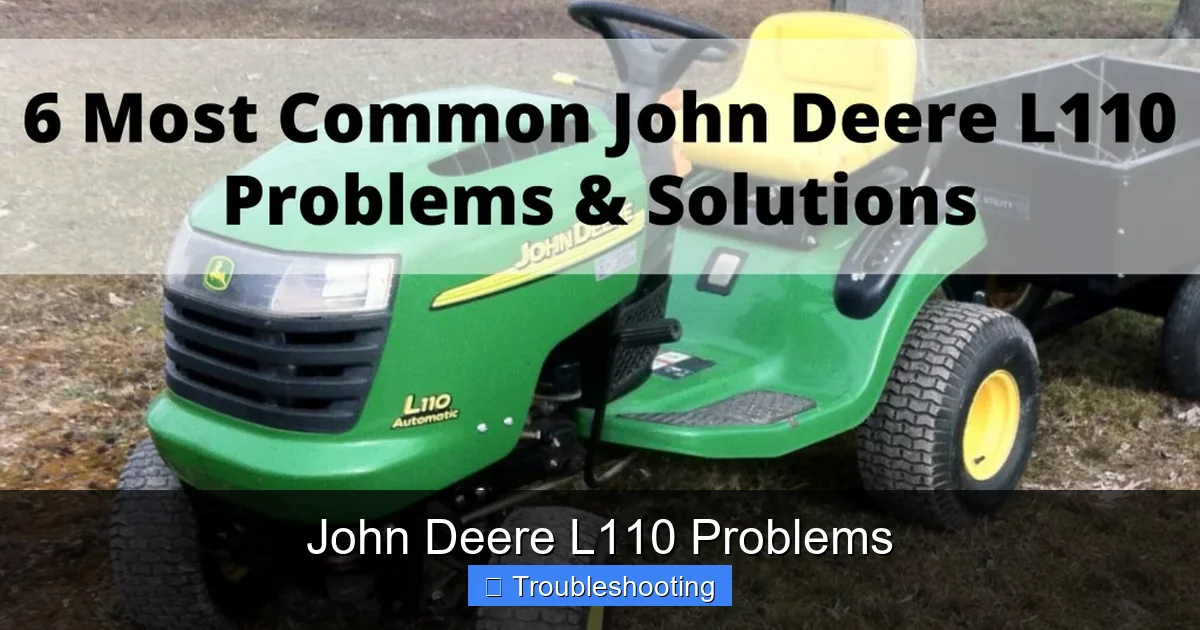
The heart of your John Deere L110 is its Briggs & Stratton engine, typically a 19 horsepower V-twin. While robust, it’s not immune to wear and tear—especially if it’s not maintained properly. Most engine-related issues on the L110 fall into a few key categories: starting problems, stalling, or loss of power.
Visual guide about John Deere L110 Problems
Image source: farmsunseed.com
Hard Starting and Stalling
One of the most frequent complaints is the L110 refusing to start or stalling after a few minutes of use. This is often due to a clogged air filter. When the air filter gets dirty, the engine doesn’t get enough air for proper combustion, leading to a rich fuel mixture. Over time, this can gum up the carburetor and cause rough idling or sudden shutdowns.
Quick fix: Check and replace the air filter every 25–50 hours of operation, or more often if you mow in dusty conditions. Also, inspect the spark plug. A fouled or worn spark plug (typically good for 100+ hours) can mimic starting issues. Remove it, clean it with a wire brush, or replace it if it looks blackened or damaged.
Fuel System Troubles
Old fuel is a common culprit behind engine problems. Gasoline can break down over time, especially if the L110 sits unused for weeks. This leads to varnish buildup in the carburetor, clogged fuel lines, and poor performance.
Pro tip: If your L110 hasn’t been used in a month or more, drain the old fuel and replace it with fresh gas. You can also add a fuel stabilizer before storing it for the season. For persistent carb issues, consider cleaning the carburetor or replacing it with a rebuild kit—available online or at parts stores.
Loss of Power or Misfiring
If your mower feels sluggish or “misfiring,” it could be a sign of worn valve clearances or a weak ignition coil. The L110’s engine relies on precise timing, and even small gaps in the valves can throw off performance.
Check the valve clearance according to the owner’s manual. If it’s out of spec, adjust it using a feeler gauge. Also, test the ignition coil with a multimeter. A reading below 0.8 ohms (primary) or 6,000–12,000 ohms (secondary) usually indicates a faulty coil.
Transmission and Drive System Issues
The John Deere L110 uses a hydrostatic transmission, which allows for smooth, variable-speed control without manual shifting. But this system isn’t foolproof. Many owners report transmission-related problems like slipping, jerking, or difficulty moving forward or backward.
Visual guide about John Deere L110 Problems
Image source: farmsunseed.com
Slipping or Jerking During Operation
This is often due to low transmission fluid. The hydrostatic transmission relies on pressurized fluid to engage the drive. If the fluid level drops (due to a leak or old fluid), the system can’t maintain proper pressure, leading to inconsistent power delivery.
How to fix it: Locate the transmission fill plug (usually on the side of the transmission housing), remove it, and check the fluid level. Add John Deere Hy-Gard hydraulic fluid until it reaches the full mark. Also, inspect the drive belt for wear or looseness. A worn belt won’t grip the pulleys properly, causing slippage.
No Movement in Forward or Reverse
If your L110 won’t move at all—or only in one direction—the issue could be the transaxle control cable. Over time, this cable can stretch or fray, preventing the transmission from engaging properly.
Check the cable for kinks, fraying, or loose connections. Adjust the cable tension using the adjustment nut near the engine. If it’s damaged, replace it with a John Deere OEM part or a compatible aftermarket version.
Excessive Heat or Noise
Unusual noise or heat from the transmission area may indicate worn bearings or a failing pump. While rare, this can happen if the transmission fluid is neglected or contaminated.
Always use clean, high-quality hydraulic fluid and change it every 2 years or 100 hours, whichever comes first. Contaminated fluid can accelerate wear on internal components.
Electrical System Glitches
The L110’s electrical system is relatively simple—battery, ignition switch, safety switches, and solenoid—but it’s prone to a few common issues. Electrical problems can be tricky because they often involve multiple components working together.
Visual guide about John Deere L110 Problems
Image source: lawnmowerly.com
Dead Battery or Slow Cranking
A weak or dead battery is one of the most common reasons the L110 won’t start. The battery should hold a charge of at least 12.4 volts. If it drops below 12 volts, it’s time for a test or replacement.
Test your battery: Use a multimeter to check voltage with the engine off. If it’s below 12.2 volts, recharge it. If it still won’t hold a charge, replace it. Also, clean the battery terminals with a wire brush and apply a thin layer of dielectric grease to prevent corrosion.
Ignition Switch Failure
The ignition switch controls power to the starter solenoid and accessories. If it fails, the engine won’t crank or start. Symptoms include a clicking sound when you turn the key or no response at all.
To test the switch, use a multimeter to check for continuity between terminals when the key is turned. If there’s no continuity, replace the switch. It’s a relatively inexpensive part and easy to swap out.
Safety Switch Malfunctions
The L110 has several safety switches—seat, blade, and brake pedal—that prevent the mower from starting unless conditions are safe. If one of these switches fails, the engine won’t start, even if everything else looks fine.
Common culprits include a broken seat switch or a misadjusted brake pedal switch. Check each switch for proper operation. For example, the seat switch should break the circuit when you stand up. If it doesn’t, clean the contacts or replace the switch.
Steering and Control Problems
While the L110 doesn’t have power steering, it should still feel responsive and stable. If your steering feels loose, unresponsive, or requires too much effort, it’s likely due to mechanical wear.
Loose or Wobbly Steering
This is usually caused by worn steering pivot bushings or a loose kingpin. Over time, the rubber bushings in the steering linkage can degrade, allowing play in the steering mechanism.
Solution: Jack up the front of the mower and check the pivot points. Look for excessive movement or play. Replace the bushings or the entire steering linkage if necessary. Tightening the kingpin nut (if accessible) may help, but worn parts will eventually need replacement.
Hard Steering
If steering feels stiff or difficult, it could be due to low steering fluid or air in the hydraulic steering system. The L110 uses a small hydraulic pump to assist steering—though it’s not powerful, it does help.
Check the steering fluid level in the reservoir (usually near the engine). Top it off with clean hydraulic fluid. Also, bleed the system if you’ve recently changed the fluid or repaired a line. This involves turning the steering wheels fully left and right several times while the engine is off.
Cutting Deck and Blade Issues
The cutting deck is the workhorse of your mower. Problems here can ruin the look of your lawn and strain the engine. Most deck-related issues stem from wear, misalignment, or debris buildup.
Uneven Cutting or Scalping
If your lawn has uneven patches or scalping (thin spots where grass is cut too short), the deck may not be level. The L110’s deck has adjustable skid plates that control cutting height.
How to fix: Park the mower on a flat surface, engage the blades, and measure the distance from the blade tips to the ground at each corner. Adjust the height using the deck lift knob or the skid plate bolts. Aim for a consistent 2.5–3 inches for most grass types.
Blades Spinning Freely
If the blades spin but the deck won’t engage, the issue is likely the PTO (Power Take-Off) clutch. This electromagnetic clutch engages the blades when you pull the lever.
Check the clutch for wear or electrical issues. A common sign of a bad clutch is a burning smell or excessive heat when engaged. Replace the clutch if it’s worn or if the solenoid isn’t receiving power.
Deck Vibration or Bouncing
A vibrating deck can be dangerous and lead to uneven cuts. This is often caused by bent blades, loose spindle assemblies, or worn bearings.
Inspect the blades for nicks or bends. Replace them if damaged. Tighten all spindle bolts and check the spindle bearings for play. If they’re loose or grinding, replace the entire spindle assembly.
Overheating and Cooling System Concerns
While the L110 isn’t prone to overheating like larger tractors, it can happen—especially in hot weather or if the cooling system is neglected.
Clogged Cooling Fins
The engine’s cooling fins (on the cylinder head and flywheel) can get clogged with grass clippings or dirt, reducing airflow and causing the engine to overheat.
Maintenance tip: Clean the cooling fins every 50 hours with a brush or compressed air. Avoid high-pressure washers, which can force water into bearings.
Fan Clutch Failure
The fan clutch helps pull air through the engine. If it fails, the engine can overheat, especially at idle or in stop-and-go mowing.
Check the fan clutch for play. If it spins freely when cold, it may need replacement. A failing clutch often causes the engine to run hotter than normal.
Preventative Maintenance Tips
The best way to avoid John Deere L110 problems is through regular maintenance. Here’s a simple checklist to keep your mower in top shape:
- Oil Changes: Change the engine oil every 50 hours or once a year. Use SAE 30 or 10W-30 oil.
- Air Filter: Replace or clean the air filter regularly—especially before heavy use.
- Fuel System: Use fresh fuel and add a stabilizer if storing the mower.
- Belt Inspection: Check the drive and deck belts for cracks or wear every season.
- Transmission Fluid: Change the hydrostatic fluid every 2 years.
- Blade Maintenance: Sharpen or replace blades annually and balance them for smooth operation.
Conclusion
The John Deere L110 is a solid, dependable lawn tractor that can serve you well for years—if you treat it right. While it’s not without its quirks, most common problems like engine stalling, transmission slipping, or electrical gremlins have straightforward solutions. By staying on top of maintenance and learning how to diagnose issues early, you can avoid costly repairs and keep your mower running smoothly.
Remember, a little attention goes a long way. Clean the air filter, check the belts, top off the fluid, and inspect the blades—simple steps that prevent big headaches. And when in doubt, consult your owner’s manual or reach out to a John Deere dealer. With the right care, your L110 will keep cutting grass like a champ for seasons to come.
Frequently Asked Questions
Why won’t my John Deere L110 start?
The most common reasons include a dead battery, clogged air filter, or old fuel. Check the battery voltage, replace the air filter, and try starting with fresh gasoline. If it still won’t turn over, inspect the spark plug and ignition switch.
How do I fix a slipping transmission in my L110?
Low transmission fluid is usually the cause. Check the fluid level and top it off with John Deere Hy-Gard fluid. Also, inspect the drive belt for wear or looseness. A worn belt can’t grip the pulleys properly, leading to slippage.
Why does my John Deere L110 jerk when I shift gears?
This is often due to low hydraulic fluid or a stretched transaxle control cable. Check the fluid level and adjust or replace the cable if it’s loose or frayed. Also, ensure the drive belt is in good condition.
How often should I change the oil in my L110?
Change the engine oil every 50 hours of use or once per year, whichever comes first. Use SAE 30 or 10W-30 oil for best performance. Neglecting oil changes can lead to engine wear and overheating.
What should I do if my cutting deck won’t engage?
Check the PTO clutch and safety switches first. A faulty clutch or a broken safety switch (like the seat or brake switch) can prevent the deck from engaging. Also, ensure the drive belt isn’t loose or worn.
Can I use regular gas in my John Deere L110?
Yes, the L110 runs on regular unleaded gasoline (87 octane or higher). However, avoid using old or stale fuel. Add a fuel stabilizer before storing the mower to prevent fuel breakdown and carburetor issues.
